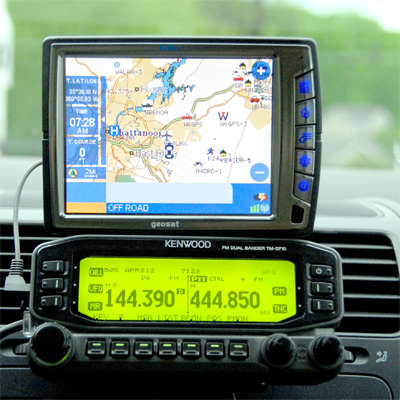
Richard and I have been busy over the last couple of weeks. He spent a day at the Belton Hamfest near Waco, Texas on October 3rd. The weekend before that, I spent a few days in Columbus, Ohio at Ohio Linux Fest. This is our first episode back from those events. I have a few hours of audio I need to sift through, but I managed to get a couple of clips from my interviews and commentary from OLF included in the second segment of this episode of the podcast. Because I had a visit from my parents and my brother and sister-in-law from New Hampshire, I haven’t been able to get the podcast out in a timely manner. I suppose after 25 releases, I should probably stop apologizing for being late but I do like it when we release on time. Anyway, enjoy our interviews and Richard’s discourse on APRS and Xastir, and stay tuned for a lot of great audio from our live endeavors coming up in future episodes. Thanks for downloading, and have a great couple of weeks.
Pat on Twitter said “Yes VK’s can have 2×4 call signs” and Russ explains
Joe NE3R likes Xastir for APRS. Joe is a Windows free Microsoft consultant
Some Windows bashing ensued
Bill KA9WKA Just found the program and is really enjoying it. Got Xastir running on his EEE PC. and tells us about www.pendrivelinux.com
Reminder that we record the show live. Go to www.lhsinfo.org for more information on dates and time
Hal W4OE is having problems with his Signal Link USB and KAM packet controllers
W9ZEB Just found the podcast and said Thanks for doing it. He even left a nice write up on his blog about us at
Joe NE3R Left us some nice words on his blog too at cryptojoe.blogspot.com Russ jumped in and squeezed all the goodness out of the post
Kent VE4KEH Made the very first donation ever to Linux in the HAM Shack and wants a show on Pulse Audio
Announcements:
Monsterb at Linux Cranks said he likes the show the other night on IRC. Go visit Linux Cranks. WARNING! They’re show is not family friendly and it is OGG only. you can find them at www.linuxcranks.info
I found some other useful programs. the first one is The MintCast. MintCast is a beginner level Linux podcast. You can find them over at www.mintcast.org
The second is Productive Linux. This one is more about getting stuff done on the desktop.
Links and Notes:
This install was done on an AMD 1.0 Ghz. Processor with 512 Megs of memory
A Jackalope is a critter native to west Texas.
Normal upgrade ordeal. clicking the upgrade button never works for me.
Downloaded the Ubuntu Live CD and it worked fine except Nautilus did not work for me.
Kubuntu live cd loaded and ran just fine with no issues
Time to install
Installer worked just like it was supposed to.
Ran fine after install
After install from machine off to desktop ready took 63 seconds to boot.
Plenty of good tools Firefox, Gimp, Compiz, Open Office, etc.
Default media player is Rhythmbox
No animal on the desktop (Thank God)
Wireless networking worked with no issues
Did not try the EXT4 file system
First Richard gave us a description of SSH
With towel in hand Russ began to speak about SSH
you can use SSH for remote to your machines over the internet or your network
SSH uses Port 22
You need your port 22 open on your firewall if logging in from out side the local net work
you need to install the SSH client and SSH server as needed
Russ is so smart
Type SSH -y username and remote machines address and you are off to the races
you will be ask for a password. then you are in.
Now you have a terminal connection to the remote machine matching the user you sign as
Forwarding X-Windows is possible but beyond the scope of this episode
Russ says that running Firefox over SSH may end in tears
Try YFKlog via SSH
SCP uses SSH to copy files from a local to remote machine
Russ suggest PUTTY for SSH in Windows, Richard suggest CygWin for SSH in Windows
In the wrap up Russ suggest Checking the MAN pages and playing with SSH and you will find it to be a great tool
We will talk about Debian in a few weeks
We are looking to have another round table episode. Let us know if you are interested in being involved
Russ finds life between the peaks very lovely
Music:
Gamma Leonis – Bacon, Linux and Tomato (Part I & II)
Today we present Linux in the HAM Shack for the eleventh time. Because of a topic snafu we switched to a completely untested and radically different format for the program. However, in the words of esteemed author Douglas Adams: “Don’t panic.” We simply rolled the live feed into something resembling a roundtable discussion of Linux and ham radio related topics that we think listeners will find rather interesting and engaging.
That being said, because of the unusual format of the program some of the dialogue may seem a little strange. In most cases it can be explained as one of the hosts reading questions or reciting information provided by the live participants in the chat room at the time of recording. We also managed to wrangle a special third co-host for the middle portion of the program.
All in all it’s a wild and crazy ride. Thank you as always for downloading the podcast, and special thanks to those who helped us out by joining us for the live recording of the program. Please check the web site for the next time you can hear us record live and participate in the program yourself.
Enjoy this special edition of Linux in the HAM Shack and we’ll be back in a couple of weeks with a program on logging software, a review or two of CrunchBang Linux and much, much more.
+1-909-LHS-SHOW
Call us and leave a message with your questions, thoughts or suggestions and we'll put you on the air!
Please Donate
Please consider a donation to our 2013 Hamvention Fund. We'd like to be there to visit with all of you this year. Our goal is shown on the thermometer at left.