Author: Russ Woodman
LHS Show Notes #030
Contributors:
- Walter, WN3LIF, writes to express his appreciation for the podcast. He has successfully interfaced his FT-450 to his Linux Mint system.
- Terry, KV6M, alerted Richard to a link spam entry in the forums at blacksparrowmedia.com.
- Bob, VE3SRE, recently found the podcast, and has been a user of GNU/Linux for many years. He's found a good contest logging program, but neglected to mention which one. Let us know, Bob!
- Paul, KC9QYB, of teenradiojourney.com, Kent, VE4KEH, and Bill, KA9WKA, join the roundtable discussion this episode.
Announcements:
- Check out Russ on Hacker Public Radio! In episode 0494, Klaatu interviews Russ at Ohio Linux Fest.
- Another generous donation came from Jim, W9GNG. Thanks very much, Jim! LHS is well on the way to their goal for sending Richard and Russ to the Dayton Hamvention 2010! If you'd like to donate, click on the Donate button at the Linux in the Ham Shack website.
Links and Notes:
- The ARRL has an article about Senate Bill 1755 being passed in the Senate and now moves to the House of Representatives for consideration. A roundtable discussion ensues.
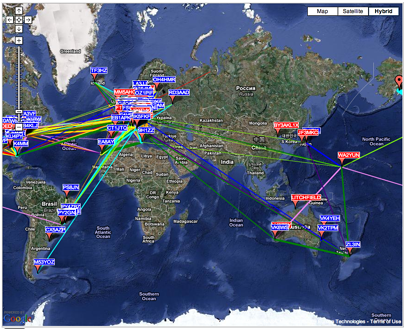
- Kent, VE4KEH, joins the roundtable to discuss WSPR (Weak Signal Propagation Reporter), written by Joe Taylor, K1JT. See also the WSPRnet page for recent observations.
- When you install the .deb package, it may not create a desktop icon. The program installs, by default, into the /WSPR directory. So, you may need to run it by doing the following in a terminal window:
		$ cd /WSPR
		$ ./wspr
- Of course, you'll also need a soundcard interface to your radio. Once running, you should go to the Setup -> Station parameters menu option and enter your callsign, grid square, transmit power, and set your audio device and rig control preferences.
- It can even be used on the experimental 600m band, if you have a license to operate there. On July 28, 2009, the FCC granted the ARRL a modified license for WD2XSH. This modified license allows the experiment to operate with 45 stations across the continental USA, Alaska, and Hawaii. So, unless you're one of the stations specifically authorized to operate on 600m, you should only provide reception reports, and not transmit on that band.
- One final note about WSPR: you must have your computer clock set very accurately. The easiest way is to set up an NTP client on your computer to synchronize your computer clock to one of the network time protocol servers. Here is an article on setting up a Ubuntu client, which should also work for Linux Mint. Or...
- If you RIGHT CLICK on your desktop clock and select "set date / time", there may be an option to automatically set the time. You can select the ntp.ubuntu.com server so you don't overload the public servers.
- When you install the .deb package, it may not create a desktop icon. The program installs, by default, into the /WSPR directory. So, you may need to run it by doing the following in a terminal window:
- Paul recently built a Pixie II QRP CW transceiver kit.
- Bill Meara, M0HBr/CU2JL/N2CQR, of the SolderSmoke podcast is also a fan and practitioner of WSPR.
- Bill, KB3CVA, has a telnet BBS online at https://phantombbs.net.
- Russ discusses a gizmodo article about Microsoft patenting the sudo command. It's not likely that the patent is enforceable. Don't Panic. 🙂 Articles on ars technica and Information Week have a more realistic slant on the issue.
- Tip: to eliminate having to enter your password each time you use the sudo command:
- First, edit the /etc/sudoers file using the visudo utility. It is considered insecure to tweak the /etc/sudoers file manually.
$ sudo visudo /etc/sudoers
- Uncomment this line by removing the # character:
# %sudo ALL=NOPASSWD: ALL
- So it now looks like this:
%sudo ALL=NOPASSWD: ALL
and save the file.
- Finally, add your user name to the sudo group. For example, to add user russ to the sudo group:
sudo usermod -a -G sudo russ
- Log out and in, and enjoy sudo without the password prompts.
- Of course, if you just want to avoid repeatedly typing your password for a session, you can issue the command:
sudo bash -
which will give you a bash terminal session as root, and you can then issue several commands as root without the need for typing sudo at all.
Music:
- "Inside Joke" by Little Thom from the album "Bottomfeeders"
- "A Little Bit of Riddim" by Michael Franti and Spearhead from the album "All Rebel Rockers"
Podcast: Play in new window | Download
LHS Episode #030: Whispers and Warnings
LHS Episode #030: Whispers and Warnings
 We've reached the end of the decade. 2009 is just about over and 2010 is just about to swoop in and overwhelm us all. It's been a fantastic year here at Linux in the HAM Shack, and we'd like to thank all of our listeners and sponsors who make the show possible. Without you, we would literally be nothing.
Hopefully everyone has enjoyed their holidays, spent time with families, given and received all of the gifts you've hope to give or receive. Warmest wishes from our homes to yours during this time of friendship and togetherness, and please accept our gift of a new podcast to take you through the rest of this special time and into the upcoming new year. May it be more prosperous and fulfilling than the ones that have come before.
73 and Happy Holidays,
Russ (K5TUX) and Richard (KB5JBV)
Podcast: Play in new window | Download
WSPR2 on Ubuntu 9.04 and 9.10
Written by Eddie, G3ZJO. Used with permission.
Well from the talk on the WWWeb I was hoping for better things I must admit. I have been away from Linux for a time. There are things in Ham Radio still that you just can only do with Windows. I did install Ubuntu 9.04 and ran WSJT that is in the repository it worked fine all be it an old version..
I have done plenty to promote the use of Linux in the Ham shack and with Fldidgi you have a wonderful piece of stable software that does everything just as well on Ubuntu etc. as it does on Windows.
I have compiled and modified WSPR to run on Linux very well so when the WSRP2 version for Linux was released I was so pleased to hear that Mr Average Ham in his shack with Linux on his machine could now fetch and run WSPR easily.
Last night I tried WSPR2.00 rev1714 on my Ubuntu 9.04. All went well, this is just what we have been looking for I thought. Then the annoying flickering of the green RECEIVING box caught my eye, obviously as processing is going on in the machine that display gets starved or something. I have seen this before it makes the software look unstable, shame that.
Decodes went ahead fine, however, those Labels are still miss aligned UTC dB DT Freq Drift, I was decoding my own beacon on 500Khz this software plainly indicated Drift - G3ZJO, no that is my Call Sign, not a drift value, if I were to run this version on Linux I would have to go in and modify the labels as before, such things just annoy me to death. But hey it works doesn't it, 'though you don't have to accept these things with Fldigi.
Then Ubuntu 9.04 informed me of the software update to 9.10, they say that WSPR runs fine on 9.10 so I went ahead with the install. Time to take a look at WSPR2 on Ubuntu 9.10, ERROR access denied. Oh yes, well it worked before, lets try WSJT, no go, try Fldigi all is fine, works great.
I know what has happened Ubuntu update has thrown out some of the libraries needed by WSPR, we are back to 'old days', I have done it all a hundred times, do I want to bother now, will Mr Average Ham in his shack want to bother? Still, Linux and WSPR has further to go before it is as easy and as acceptable as Windows, shame.